Data Observability
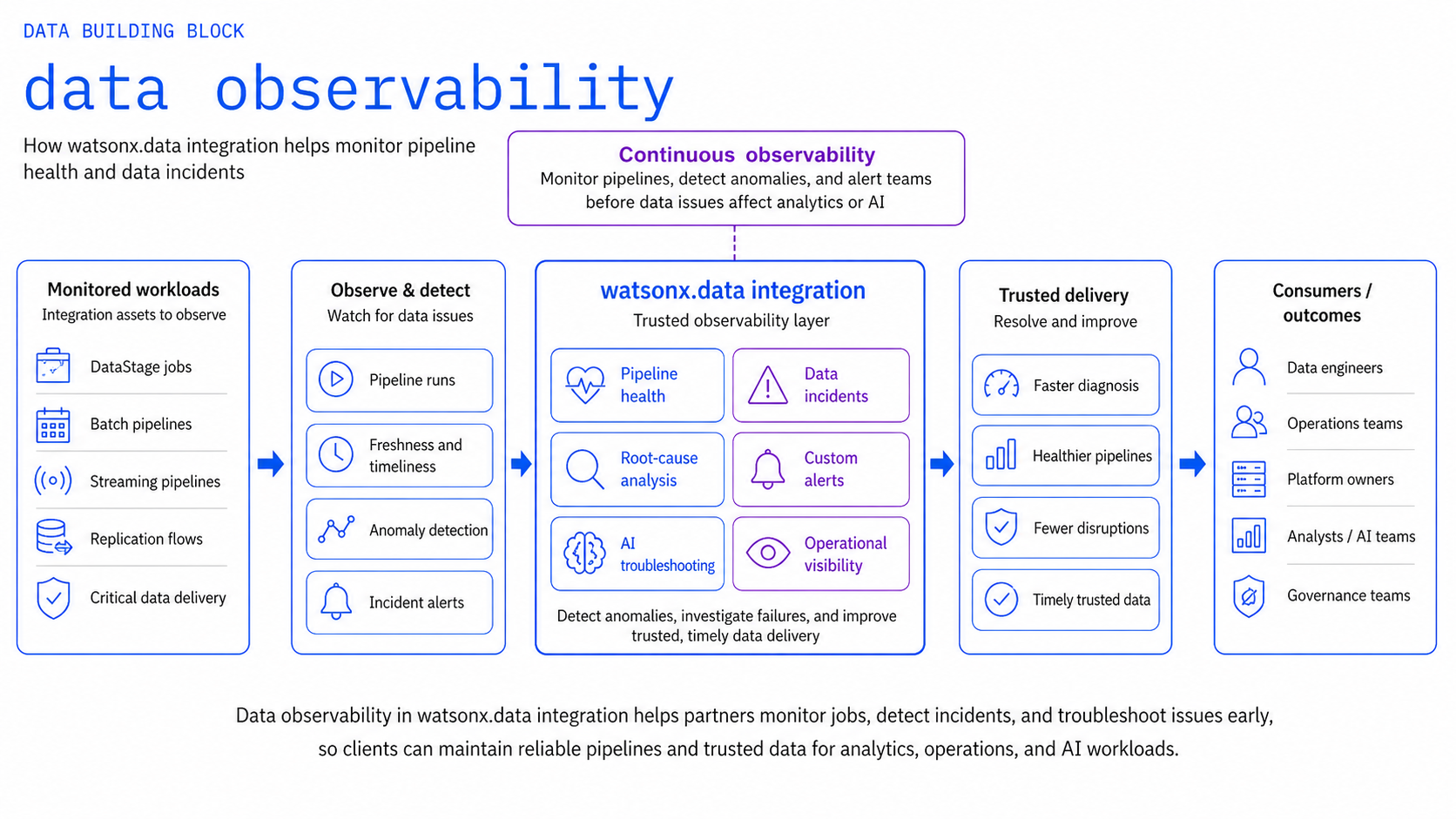
Use watsonx.data Integration (Databand) and IBM Data Observability by Databand to detect, investigate, and resolve data incidents, SLA breaches, and data anomalies before unreliable data impacts downstream analytics, lakehouse tables, or AI agents.
Product mapping
watsonx.data Integration (Databand) — continuous pipeline, job, task, and dataset monitoring, anomaly detection, SLA tracking, and alerting; integrates natively with watsonx.data Spark engines and DataStage flows.
GitHub Repository
The complete source code and examples are available in the GitHub repository:
Included Assets
| Asset | Description |
|---|---|
| databand-pipeline-monitor | Reference API for pipeline and run health — Databand monitoring blueprints, metric dashboards, and alerting rule definitions |
| openlineage-emitter | Emit OpenLineage START / COMPLETE / FAIL events from Python pipelines, DataStage flows, and Spark jobs |
| databand-alert-templates | Reusable YAML alert-policy templates — apply null-rate, schema-drift, SLA-breach, and volume anomaly policies across pipelines |
Bob Skills
| Skill | Description |
|---|---|
| databand-pipeline-setup | Databand pipeline onboarding, OpenLineage event design (START / COMPLETE / FAIL), alert policy authoring (null-rate, schema-drift, SLA-breach), and IAM auth patterns |
Installing skills
Download the skill .zip files and copy the skill folders to ~/.bob/skills (global) or <project>/.bob/skills (project-level). See the Data Skills and Modes page for full installation instructions.
Why It Matters
Data quality issues in modern lakehouses are discovered in two ways: proactively through automated monitoring and anomaly detection, or reactively when executive dashboards break and AI agents produce incorrect actions. Data Observability provides the proactive safeguard, automatically detecting failed runs, abnormal run durations, schema drift, unexpected data volume drops, and data quality degradation across lakehouse pipelines.
Business Value
Key outcomes
| Outcome | What It Means |
|---|---|
| Early incident detection | Catch pipeline run failures, dataset volume drops, and schema drift before downstream consumers are impacted |
| Drastically reduced MTTR | Correlate alerts with full pipeline run history, source logs, and execution parameters for rapid root-cause diagnosis |
| Protect critical data SLAs | Ensure essential lakehouse datasets and Iceberg tables arrive, refresh, and finalize within target windows |
| Safeguard AI model reliability | Prevent AI agents and ML models from ingesting incomplete, stale, or malformed training and inference data |
| Unified observability pane | Single pane of glass across DataStage, Apache Spark, Airflow, and custom Python integration jobs |
When to Use
Use Data Observability when:
- Lakehouse data pipelines and batch transformations are mission-critical to business operations.
- You need automated alerting on run duration, task failure, row-count anomalies, or freshness delays.
- Data workflows span multiple runtimes (e.g., DataStage ETL, watsonx.data Spark, Airflow DAGs).
- Engineering teams need a shared incident management view with historical baselines.
- Spark workloads in watsonx.data require deep execution, task-level, and dataset-level tracking.
What to Observe
| Area | Monitored Metrics & Signals |
|---|---|
| Pipeline Health | Failed runs, task states, execution duration, unexpected retry loops |
| Data Health | Freshness lag, dataset row counts, schema drift, column null rates, distribution anomalies |
| Dependencies | Upstream and downstream dataset lineage, cross-pipeline impact mapping |
| Operational Context | Error logs, job parameters, cluster resource utilization, alert severity tiers |
Reference Flow
flowchart LR
    P["DataStage / watsonx.data Spark / Airflow / Python"] --> O["watsonx.data Integration<br/>(Databand Engine)"]
    O --> M["Automated Baseline Metrics<br/>Lineage Context · Anomaly Detection"]
    M --> A["Proactive Alerting<br/>(Slack / Teams / PagerDuty / Webhook)"]
    A --> I["Incident Investigation & Triage"]
    I --> R["Automated or Guided Remediation"]
What to Demonstrate
- Register or instrument a sample DataStage flow or Spark job in Databand using OpenLineage.
- View active and historical execution runs in the Databand dashboard.
- Configure an automated alert policy for a realistic anomaly (e.g., run duration > 2x baseline, 30% row drop).
- Trigger a simulated pipeline failure or data volume anomaly.
- Inspect the generated alert, error traceback, and upstream dataset impact.
- Walk through the guided triage and resolution flow.
Design Considerations
Observability design guidelines
- Focus observability alerts on high-impact data products and datasets tied to explicit SLAs.
- Set dynamic thresholding based on historical baselines rather than static hardcoded limits to prevent alert fatigue.
- Instrument OpenLineage at both the job level and dataset level for complete root-cause visibility.
- Establish clear escalation and on-call routing for critical lakehouse pipeline incidents.
IBM Products Used
| Product | Role |
|---|---|
| IBM watsonx.data integration | Enterprise data integration platform including built-in Data Observability capability |
| IBM Data Observability by Databand | Full-stack data observability, pipeline and dataset monitoring, anomaly detection, and SLA tracking |
| IBM watsonx.data | Open lakehouse platform providing managed Spark execution tracked by Databand |