Bob+ Skills and Modes – Automation
IBM Bob ships with purpose-built Skills and Custom Modes for every Automation building block, giving engineers an AI-assisted workflow to plan, build, configure, and operate infrastructure, security, and optimization capabilities directly from their IDE.
How to install the Skills
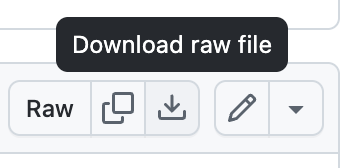
The Skills have been packed into a single .zip that you can easily download and install. Go to the skills.zip page and click the Download raw file icon at the upper-right of the page. Copy all skill folders at either the global, ~/.bob/skills, or project-level, <project>/.bob/skills
Skill Taxonomy
Each Skill for IBM Building Blocks often aligns with an IBM product but not always. For specifics on how each skill works, read through the associated SKILL.md.
 Automation Skills Automation Skills | |
|---|---|
 Operate Operate |
Using the IBM Cloud CLI; ibmcloud
Infrastructure-as-code: Ansible
Infrastructure-as-code: Terraform
Maximo Code Optimization
Maximo Java Conversion
|
 Secure Secure |
Non-human Identity: Vault
Application Risk & Continuous Compliance
Cryptographic & Quantum-Safe Readiness
|
 Optimize Optimize |
Automated Resource Management (ARM): Turbonomic
Full-Stack Application Observability
|
Automation Modes
Instructions and related files for these custom modes can be found in their respective repository.
|
Automation Modes | |
|---|---|
| Operate |
Ansible Ops
|
| Secure |
Secrets Management
Application Risk & Continuous Compliance
Cryptographic & Quantum-Safe Readiness
|
| Optimize |
Automated Resilience & Compliance
Automated Resource Management
Technology Financial Management & FinOps
Full-Stack Application Observability
|
For the complete list of all Building Block skills across AI, Data, and Automation, see the Bob+ Skills page.